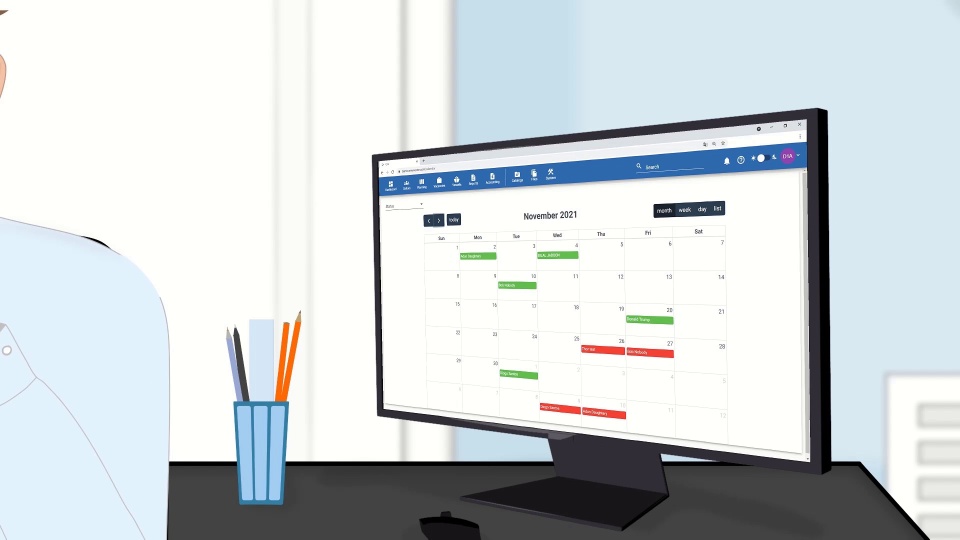


The same data is entered three times
A CV goes into a spreadsheet, then into a contract, then into an invoice. In Crewvector the profile is created once and travels through matching, planning and finance as the same record.

Crewvector is cloud-based crewing software that keeps one seafarer record from the first application to sign-off – recruitment, compliance, planning, payroll and invoicing in a single system.
Crewing agencies, manning companies and ship managers around the world use Crewvector for their daily crewing operations.

MCL International
Mobicacrew
Poseidon Maritime

V-Isea Vietnam
Aries Navigation

Marlog Service Limited

NRS Romania

Nembe Crude Oil Export Terminal Ltd.

Ocean Crewing Congo
Seapal Marine Services

Sunrise Manpower

Trinidad Mooring and Launch

Marlog Guyana Inc

TRACODI SONG DA JSC

iCrew Sdn Bhd

Seventy Seven Consulting

Connect Energy Services

Neopoint
SVS Management
Crewvector works as crew management software for shipping companies that operate their own fleet, and as a daily tool for agencies that supply crew to other people's vessels.
You recruit seafarers and supply them to your principals' vessels. You work with several clients at once, keep your own candidate pool and report back to the shipowner on who is ready to join.
You operate your own fleet and answer for manning and compliance on every vessel. You need to know who is on board, who is due for relief and whose documents will not last until the next port.
Crewing teams rarely lose time on difficult decisions. They lose it on re-typing the same data and chasing documents that already exist somewhere. A crewing management system removes that layer of work.
A CV goes into a spreadsheet, then into a contract, then into an invoice. In Crewvector the profile is created once and travels through matching, planning and finance as the same record.
Nobody checks validity until the gangway or an inspection. Our system verifies documents against the joining date before an assignment is confirmed and sends notifications long before anything runs out.
A tanker needs one set of endorsements, a bulker another. The certificate matrix places vessel-specific rules on top of company rules, down to the minimum validity required at embarkation.
Good candidates stay unnoticed in a database of several hundred. Crewvector ranks candidates against the vacancy automatically and shows matching and missing criteria on each card.
The same contract terms are entered once for wages and again for the client invoice. In our system both are built from a single contract, created automatically when a seafarer is assigned.
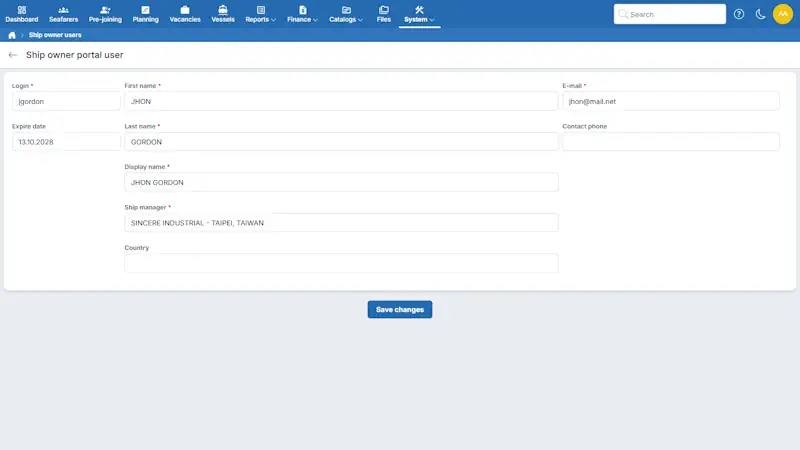
Every question turns into a message and an attachment that is outdated on arrival. The shipowner portal gives each principal direct access to their own crew, with permissions set by your administrator.
Every step below uses the same seafarer record. Information collected during recruitment continues into planning, compliance checks, documents and finance – nothing is entered twice.
Seafarers submit their profile through your online form, or your team uploads an existing CV.
AI-assisted import reads the profile, sea service, certificates and document details and presents them for review before saving.
The system ranks your internal pool against the vacancy and shows matching and missing criteria on each candidate card.
A recruiter selects the candidate and chooses the stage: Planning, Joining or On Board.
Crewvector checks company-wide and vessel-specific requirements, including the minimum validity a certificate must have at embarkation.
Assign a checklist and track completed and outstanding items on the planning board.
Create crew lists, crew change reports, Letters of Guarantee and exports based on your own templates.
Contract terms and additional charges turn into accruals, payslips, billing records and client invoices.
Request a demo to explore how Crewvector can support your team's crewing process.
Crewvector is ship crew management software built around seven connected areas, from recruitment and seafarer records to finance and shipowner collaboration.
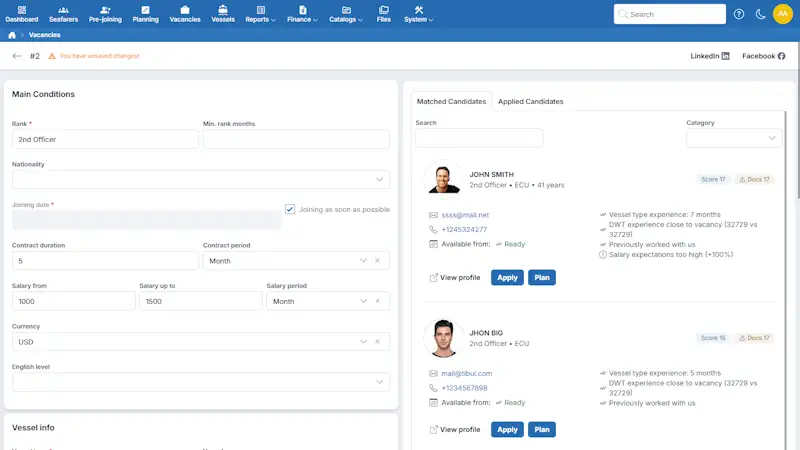
Create a vacancy with the rank, vessel, joining date and salary range, then publish it on your own website through a ready-made element or share it on LinkedIn and Facebook. Seafarers apply through the online form, and their profiles land directly in your database. At the same time, the system searches your existing pool and shows candidates with a score you can explain to your principal.
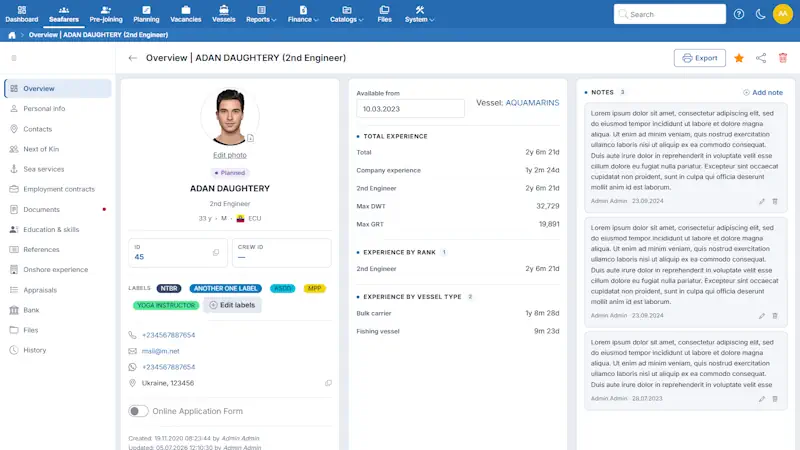
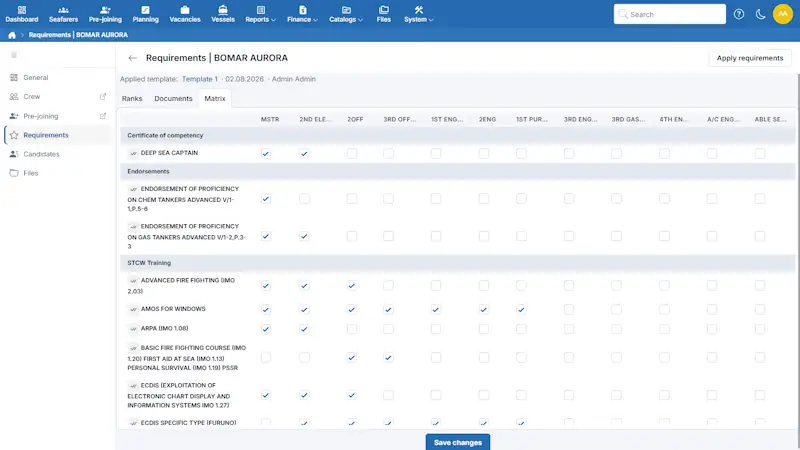
One profile holds documents, sea service, education, appraisals, references and next of kin. AI-assisted import adds data from a CV or a certificate without overwriting what is already there – it fills the gaps and leaves the rest untouched. Certificates are controlled by a matrix built on ranks, so you see at a glance who is ready and who is not.
Every vessel gets its own set of document requirements on top of your company rules. Inside a ship crew management system this matters more than it sounds: the same rank can need different endorsements on a tanker and on a bulker. The vessel view shows the current crew, their document numbers and dates, and marks what is missing or about to expire.
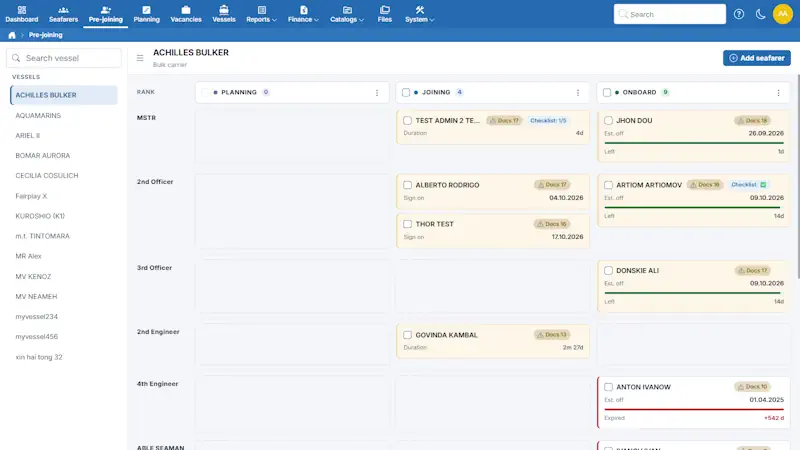
A visual timeline shows who is on board, who is joining and who is due for relief. Assignments are moved by dragging, and the board warns you when a seafarer does not meet the vessel requirements. Crew lists, Letters of Guarantee and preliminary reports are generated straight from the planning view.
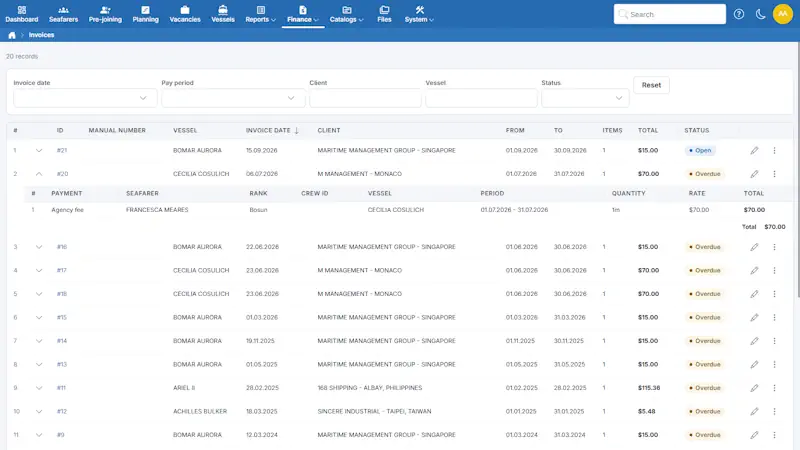
The employment contract is created automatically when a seafarer is assigned, with separate accrual periods for travel, quarantine and time on board. Payroll and client invoices are calculated from the same contract, so the wage sheet and the invoice can never disagree.
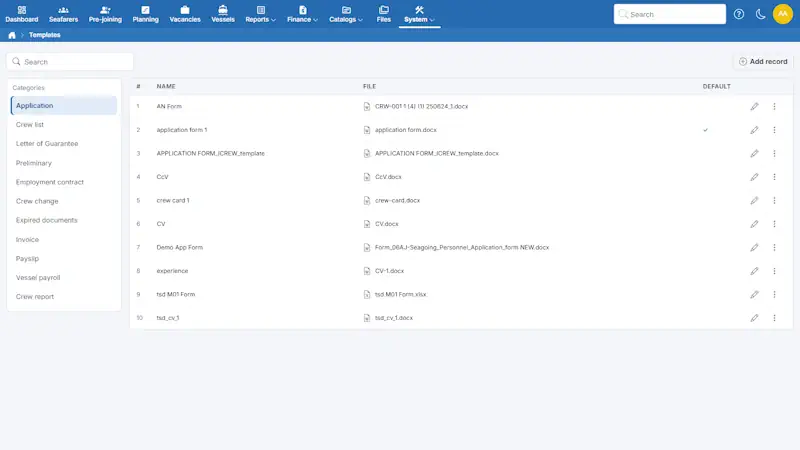
Crew lists, crew change reports, Letters of Guarantee and PEME referrals are generated from current data in seconds. Beyond the standard set, you can build your own templates in Word, Excel or PowerPoint, so every document that leaves your office keeps your company format.
Shipowners see the crew assigned to their vessels without asking you for a list. Your administrator creates roles, defines what each role can view or edit, and assigns them to users – so one principal never sees another principal's vessels.
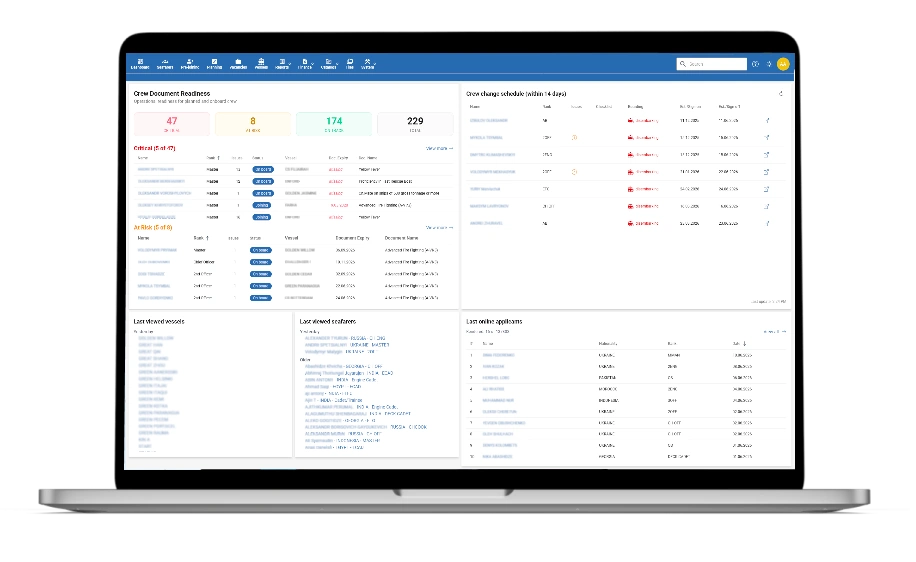
Interactive product tour
Open the interactive tour to see how recruitment, compliance, planning and finance connect inside the product. No registration and no credit card required.
Switching maritime crew management software is usually a project with a manager, stages and a timeline. With Crewvector it is closer to opening an account.
If you do not need to import existing data, setup takes a few hours – a working day at most.
Moving your records from Excel or another system costs nothing. You send us the files or the database, and we handle the rest.
For a full migration from an old system, allow up to two weeks depending on the volume and quality of the data. Your team's part is to send the files and check the result.
There is no separate implementation charge. You pay for the subscription and nothing else.
A full user guide is available online. If your team prefers a walkthrough, we run a video call and show the system on your own data.
Email and WhatsApp, in English.
Your maritime crewing system holds passports, medical certificates and bank details for hundreds of people. Here is exactly where that data lives and who can reach it.
All data is hosted in Germany and the Netherlands, within EU jurisdiction.
Each customer runs on their own database. Your records are never stored alongside another company's data.
Database backups are created every night and retained for fifteen days.
Changes are replicated to a separate database server during the day, so the system can be restored quickly if the main server fails.
Your administrator creates roles, sets view and edit permissions for each of them, and assigns roles to users. Nobody sees more than their role allows.
User actions are logged, so you can always see who changed what and when.
If you decide to stop using Crewvector, we prepare a full copy of your database and files on written request and send you a download link. It normally takes one to two days.
Most crew software for the maritime industry is priced per vessel, which makes budgeting hard for an agency that does not own a single ship. Crewvector is priced per user.
The subscription depends on how many people in your office use the system. The number of seafarers in the database and the number of vessels you serve do not change the price.
Paying for three, six or twelve months in advance reduces the rate.
The price per user goes down as the number of users grows.
There is no implementation charge, and moving your existing data into the system is included.
Crewvector ranks candidates from your database against the vacancy requirements and shows which criteria match and which are missing. The score considers vessel experience, engine type, DWT range, salary expectations, English level, documents, visas and availability for the joining date.
Yes. Requirements are defined on two levels: company-wide rules by rank, and vessel-specific requirements that extend or override them. For each rank and document you can also set the minimum validity a certificate must have at the moment of embarkation.
Yes. Crew lists, contracts, invoices and profile exports can be generated using your own Word, Excel and PowerPoint templates, so documents keep your company’s format.
Yes. Seafarers can return to the online application form to update their details or add documents. New submissions remain separate until your team reviews them.
Yes. Crewvector works in a mobile browser with a responsive interface. There is no separate mobile app, and an internet connection is required — offline use on board is not supported.
Yes. Crewvector is built on an API architecture, and custom integrations can be discussed for your setup. Ready-made connectors to accounting systems, email and calendars are not currently available.
No. Pricing depends on the number of users in your team, not on the number of seafarers or vessels, so there is no minimum database or fleet size to start.
Yes. We provide access to a demo environment for one to two weeks, so your team can explore the system and work through typical crewing scenarios before deciding.
Tell us how your team works today and we will show how the same process runs in Crewvector. No obligation, and no credit card to get started.
Thank you!
Your request has been sent.
Our team will contact you soon.
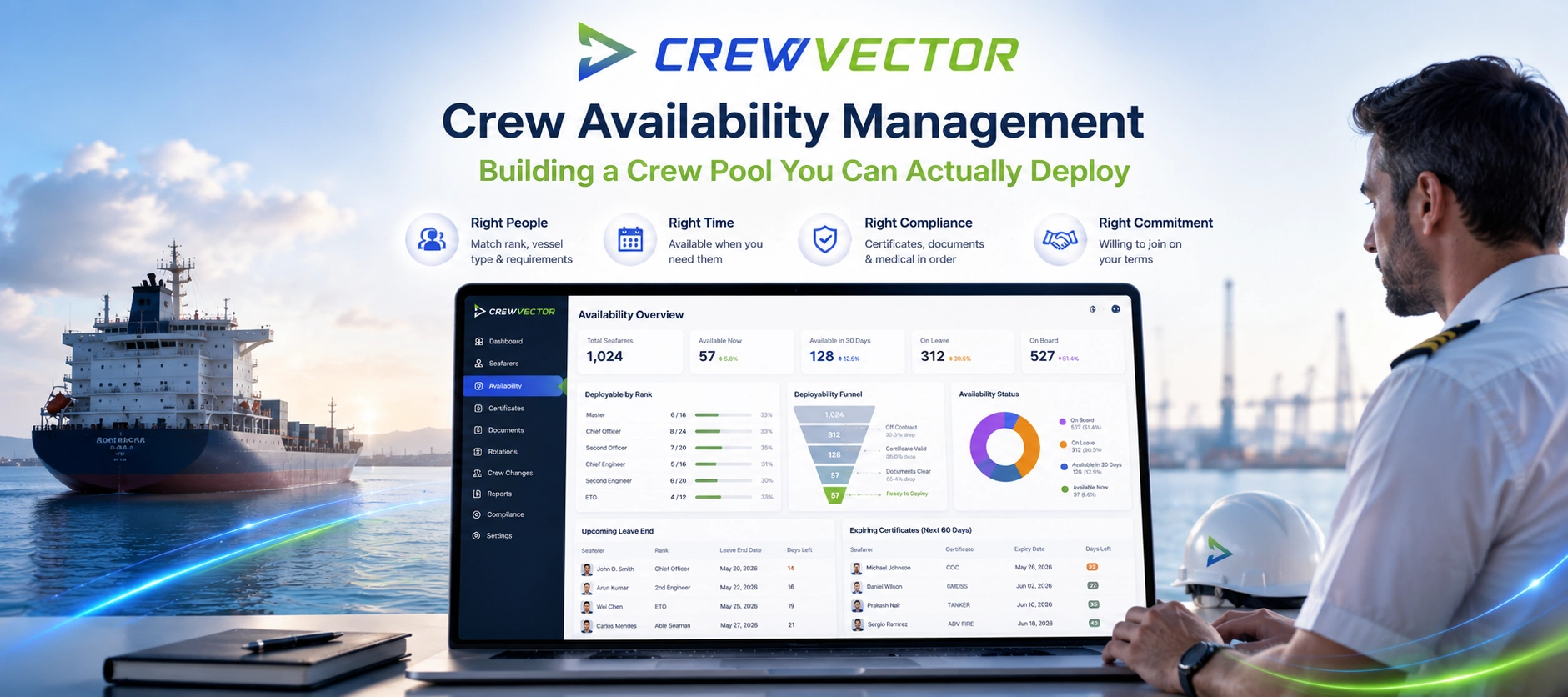
26.06.2026
A practitioner guide to crew availability management — the gap between a seafarer being in your database and being genuinely deployable. It breaks down the layers that decide real availability (status and leave, certificate validity, visa/medical readiness, willingness), shows where pools quietly go stale, and explains how to keep one current. Includes a nominal-vs-deployable comparison table, an audit checklist, and a section on why offshore and deep-sea behave differently. Education-first, with Crewvector kept to two light contextual mentions near the end.
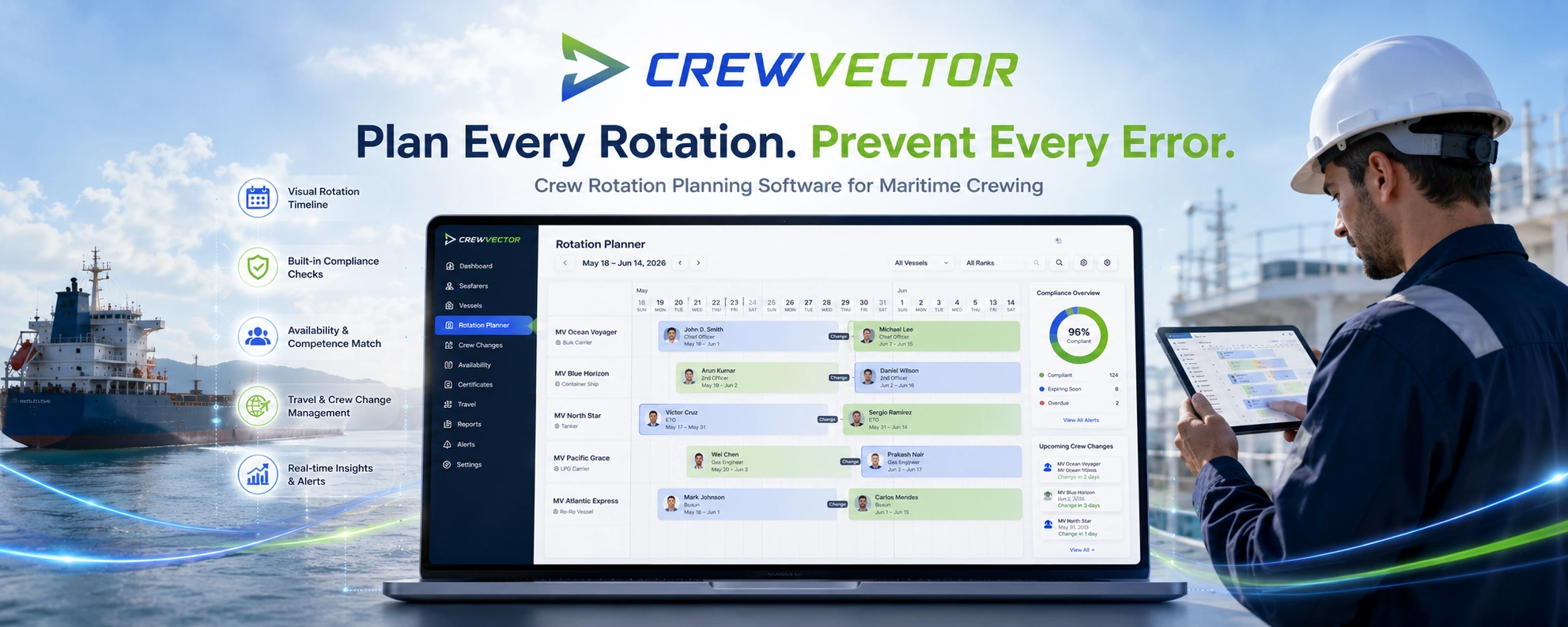
22.06.2026
Crew rotation planning software for maritime crewing. Plan rotations, reliefs and crew changes on a visual timeline, with compliance visibility and certificate checks built into every assignment.

19.06.2026
Crew document management software for maritime crewing. Track seafarer certificates, medicals, visas and expiries in one place, with AI document import, compliance checks and built-in verification.