Maritime Payroll Software

Calculate seafarer wages straight from the employment contract, with separate rates for travel and time on board, then build payroll for any period and payslips from the lines you choose.

  • Separate rates for travel days and time on board
  • Pay terms set once per vessel
  • Payroll in multiple currencies
  • Wages and client invoices from the same contract
Payroll in Crewvector with an expanded seafarer contract showing its pay lines, rates and totals

Crew Payroll Problems Crewvector Solves

Travel and on-board days split by hand

A seafarer earns one rate on the way to the vessel, another on board and another on the way home. In a spreadsheet these days are separated manually, and one wrong date means a wrong wage.

In Crewvector each pay line in the contract is tied to its period, so the marine payroll software applies the right rate to travel and on-board time without manual splitting.
Contract data typed again for payroll

Payroll usually starts by re-entering the seafarer, vessel, dates and rates from the contract, and every later change of dates has to be copied again into each sheet that uses them.

In Crewvector the contract is created when the seafarer is assigned to a vessel in crew planning, and the vessel’s pay terms are loaded into it automatically. If a sign-on or sign-off date changes, payroll amounts are recalculated from the contract.

Wages and the principal’s invoice stop matching

When the wage sheet and the invoice to the principal are kept separately, the same terms are entered twice and the totals drift apart.

In Crewvector the seafarer’s pay lines and the principal’s invoice lines sit in the same contract, so both are prepared from one source.

Features of Crewvector Maritime Payroll Processing Software

Payroll is not a separate maritime payroll system you buy on top: it is part of every Crewvector subscription and works with the same contracts, vessels and seafarer records your team already uses for crew planning. The features below follow the way a payroll is prepared, from the contract to the report.

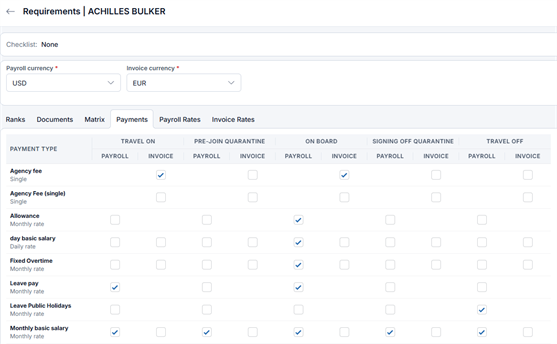
Vessel payment terms in Crewvector: payment types by travel, quarantine and on-board periods for payroll and invoicing

Pay terms set once per vessel

Payment terms are set up once for each vessel and loaded into every seafarer’s contract automatically when the seafarer is assigned to that vessel in crew planning. Each line has a payment type, monthly or one-off, the contract period it applies to and the rate.

Payroll lines with pay periods and monthly rates in a seafarer contract in Crewvector

Accrual periods per contract

Every payroll line is tied to a period of the contract, so travel days and time on board can each carry their own rate:

  • Travel on: from the start of the contract to sign-on
  • On board: from sign-on to sign-off
  • Travel off: from sign-off to the end of the contract

Until the voyage status confirms sign-off, its date is treated as planned. Once the status changes, payroll uses the actual date.

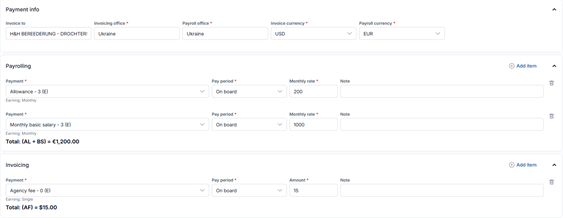
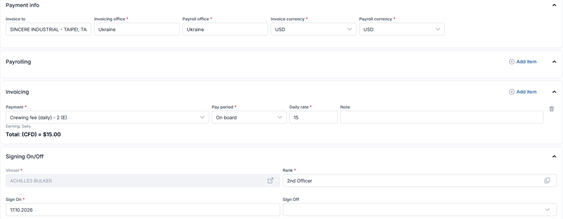
Seafarer contract in Crewvector with payroll in euros and the principal's invoice in US dollars

Payroll in multiple currencies

Each contract can be paid in its own currency, so a crew paid partly in US dollars and partly in euros is handled in one payroll.

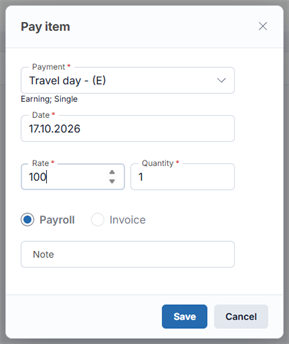
Adding a one-time pay item with payment type, date, rate and quantity to a seafarer contract in Crewvector

One-time charges

Amounts that are not part of the regular pay terms are added to the contract as separate transactions. Each one is included in the first payroll document whose period covers its date.

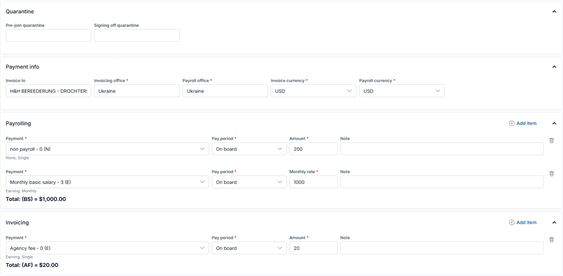
Seafarer contract in Crewvector with quarantine dates, payment info, payroll lines and invoice lines

Payroll for any period

Choose a period and Crewvector lists every active contract with the seafarer, vessel, number of lines and total for that period. Open a contract to see each line with its quantity, period, rate and total, and narrow the list by vessel or status.

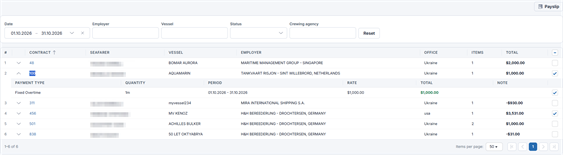
Payroll for October in Crewvector with contracts and individual pay lines selected for a payslip

Payslips from selected lines

Select a whole contract or individual lines and create a payslip in one step. Each payslip shows the seafarer, period, office, currency and the lines it includes, takes a remark for the seafarer and can be exported in your own document template.

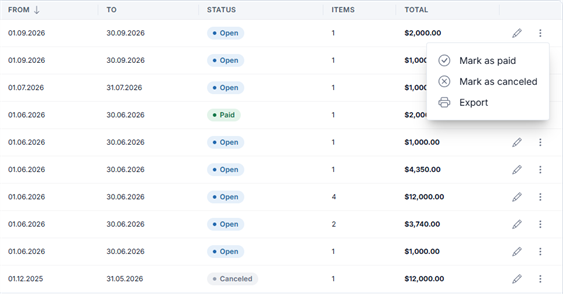
Payslips with Open, Paid and Canceled statuses and the Mark as paid and Mark as canceled actions in Crewvector

Locked once paid or cancelled

Mark a payslip as paid once the money has gone out, or cancel it. Either way it becomes read-only, so a closed payment cannot be changed afterwards.

Vessel payroll report in Crewvector with crew members, ranks, sign-on and sign-off dates and amounts for a period

Vessel payroll report

See the payroll for one vessel over any period: each crew member with rank, sign-on and sign-off dates, sign-off reason and amount. Export it through your own Word or Excel template, in the format your principal or accountant expects.

Seafarer contract in Crewvector with payment info, payroll and invoice lines for the principal and the vessel assignment

Client invoices from the same contract

Next to the payroll lines, each contract holds the lines you invoice to the principal. Billing builds client invoices from them, so the seafarer's pay and the principal's invoice come from one set of contract data.

Marine Crew Payroll Software for Agencies and Ship Managers

  • Crewing and manning agencies

    You pay seafarers on behalf of several employers and invoice each principal. Payroll can be filtered by employer and crewing agency, and the invoice lines sit in the same contract as the wages, so every principal is billed on the terms the seafarer is paid on.

  • Ship managers and owners

    You run payroll for your own fleet, so seafarer payroll software has to work vessel by vessel. Contracts are created when seafarers are assigned to vessels in crew planning, and the vessel payroll report shows each ship’s crew costs for any period.

See one of your crew contracts calculated in Crewvector

Request a Demo

How to Start Running Payroll in Crewvector

Start the same day

Without a data import, setup takes a few hours, a working day at most.

Free data migration

Existing data from Excel or another system is moved for free. Send us the files, and we handle the rest.

No setup fee

There is no separate implementation charge.

FAQ

Can the principal be charged a different amount from what the seafarer is paid?

Yes. A contract keeps two separate sets of lines: payroll lines for the seafarer and invoice lines for the principal. Each set has its own types, periods and rates, so your charges to the principal and the seafarer's wage do not have to match.

Can payroll data go to our accounting software?

There are no ready-made integrations with accounting software yet. Crewvector has an API, so your accounting system can pull payroll data from it, and payslips and invoices can be exported.

Can the Crewvector system send money to seafarers?

No. Crewvector prepares the payroll and payslips, and transfers to seafarers or their families are made by your company through your bank. After that, the payslip is marked as paid in the system.

Can we test payroll on our own contracts before deciding?

Yes. You get a demo environment for one to two weeks, so your team can enter real contract terms and run a payroll period before making a decision.

Who in our team can see payroll data?

Your administrator creates roles and sets view and edit rights for each of them. Payroll can stay visible only to the people who prepare and pay it.

Where is payroll data stored?

All data is hosted in Germany and the Netherlands, in a separate database for each customer, with nightly backups kept for 15 days.

Want to See Your Crew Payroll in Crewvector?

Send us one of your current crew contracts, and we will show how its travel and on-board periods turn into payroll and a payslip in Crewvector. No obligation, and no credit card to get started.

Live in a day · Free data migration · No setup fee

Read Our Blog

Crew Availability Management: Building a Crew Pool You Can Actually Deploy

26.06.2026

Crew Availability Management: Building a Crew Pool You Can Actually Deploy

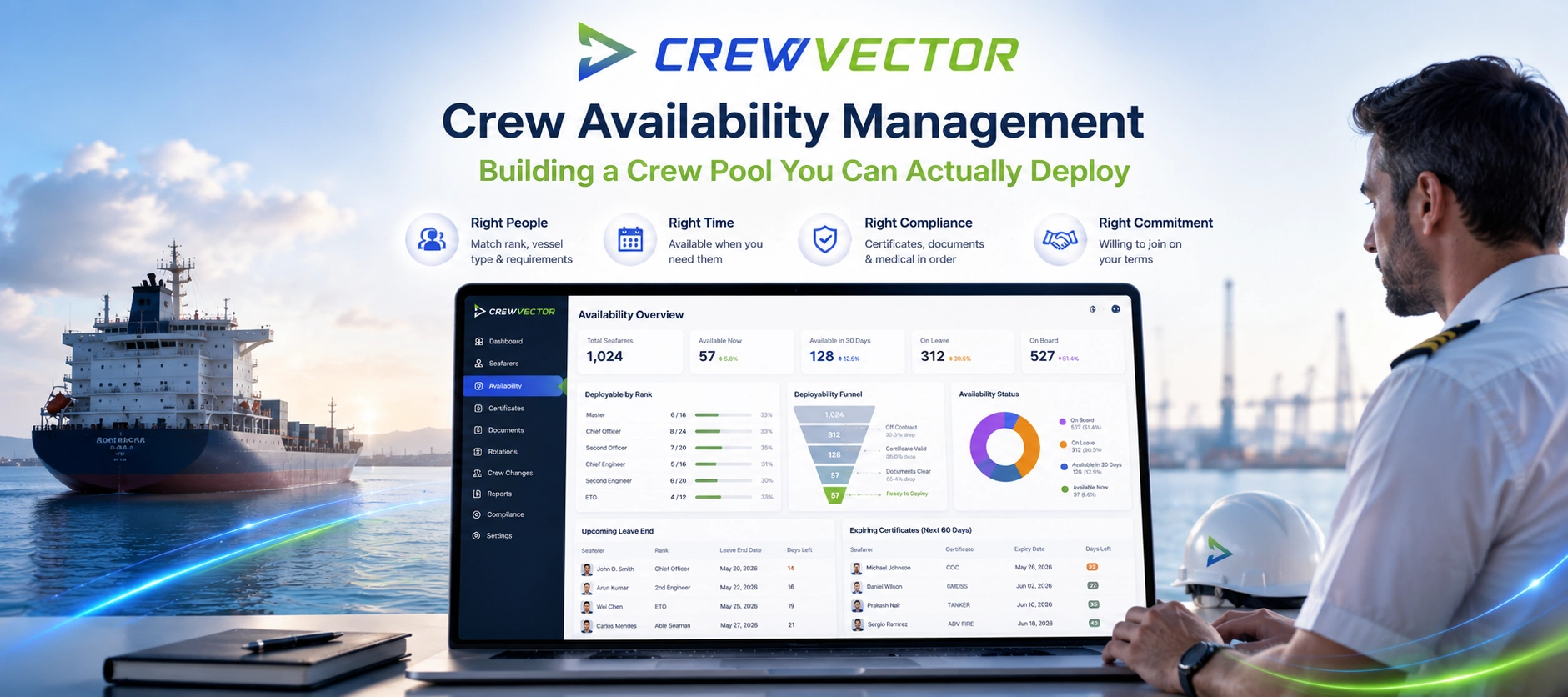
A practitioner guide to crew availability management — the gap between a seafarer being in your database and being genuinely deployable. It breaks down the layers that decide real availability (status and leave, certificate validity, visa/medical readiness, willingness), shows where pools quietly go stale, and explains how to keep one current. Includes a nominal-vs-deployable comparison table, an audit checklist, and a section on why offshore and deep-sea behave differently. Education-first, with Crewvector kept to two light contextual mentions near the end.

Maritime Recruitment Software for Crewing Teams

24.06.2026

Maritime Recruitment Software for Crewing Teams

Maritime recruitment software for crewing teams and manning agencies. Publish vacancies, screen seafarer applications, and convert candidates into ready crew in one platform.

Crew Rotation Planning Software for Maritime Crewing

22.06.2026

Crew Rotation Planning Software for Maritime Crewing

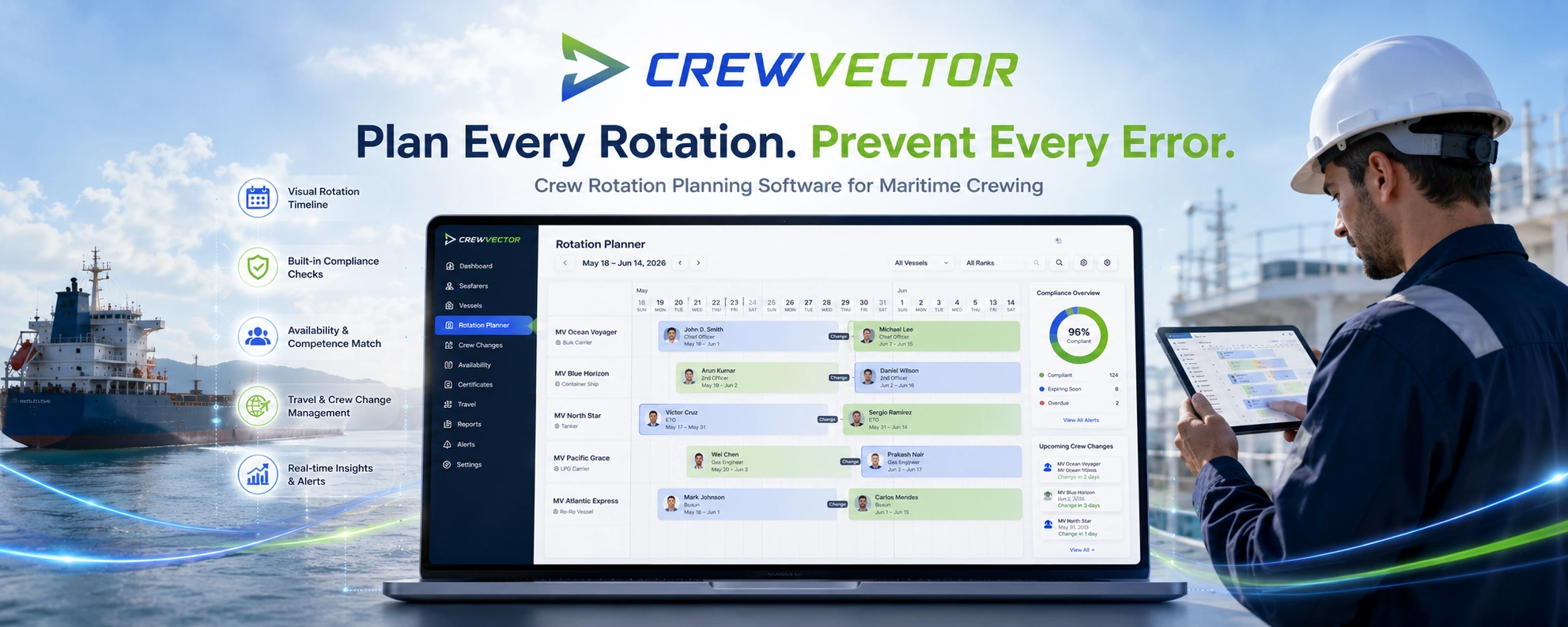
Crew rotation planning software for maritime crewing. Plan rotations, reliefs and crew changes on a visual timeline, with compliance visibility and certificate checks built into every assignment.

Crewvector Quick Tour